How to Render an Interactive Human Design Chart with SVG and JavaScript
Turn any humandesignapi.nl v2 response into a working Human Design chart by injecting one <style> block into a pre-themed SVG. No framework and just a few lines of vanilla JavaScript.
Posted by
 Matthijs
Related reading
How to Use the Human Design API in Zapier: A Step-by-Step Zap Recipe
No native Human Design app needed. Use Webhooks by Zapier as the trigger and a Custom Request action with a Bearer token to call the /v2/charts/coordinates endpoint from any Zap.
How to Build a Human Design Chart Generator in Make.com (No Code, 2026)
Build a Human Design chart generator in Make.com in under 30 minutes: a webhook captures birth data, one HTTP module calls the API, and a router fans the result to email and Google Sheets.
Does Bodygraph.io Have an API? Human Design Chart Data for Developers
Neither Bodygraph.io nor MyBodygraph offers a public developer API. Here are the three options developers actually use to generate Human Design charts programmatically.
What you'll build
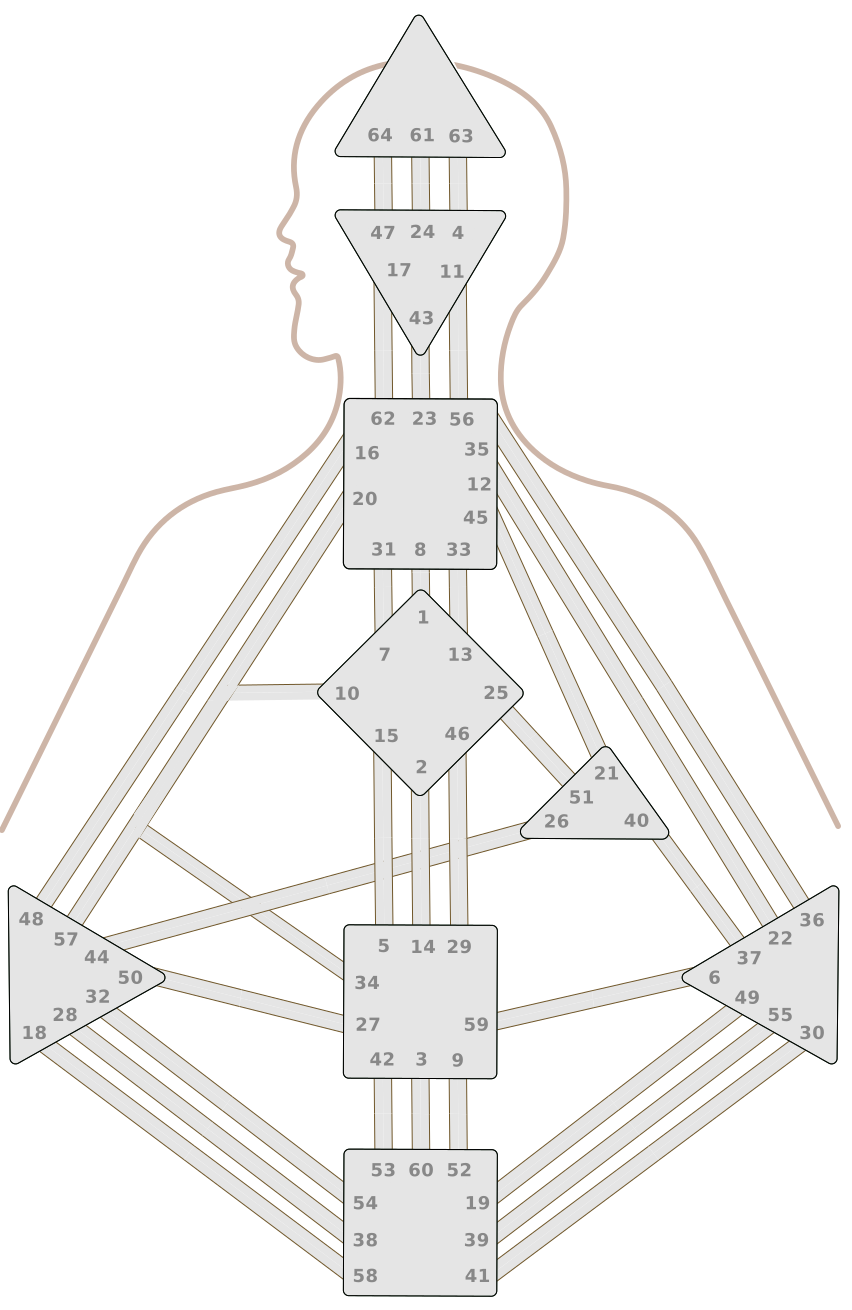
Think of the chart SVG like a coloring book page. It starts off painted entirely gray. When you hand it someone's birth data, a small JavaScript function reads it and figures out which shapes to color: the design (unconscious) side and the personality (conscious) side.
That's the whole idea. You paste the SVG into your page, call one function with the API data, and the chart comes to life. No framework or SDK's.
Just a couple lines of vanilla JavaScript. Takes any POST /v2/charts/ response and produces a working interactive chart.
Fun fact: the example chart is mine :-)

Prerequisites
Two things before you write any code:
- The chart SVG: download it at /blog/render-human-design-chart-svg-javascript/chart.svg. This is the blank chart template. It already has all 64 gates, 9 centers, and color slots built in. It renders as a fully gray chart with no JavaScript at all.
- A humandesignapi.nl API key: the Developer plan at €35/month unlocks
POST /v2/charts/coordinates, which returns the activation data this renderer needs. The Hobbyist plan's/v2/charts/simpleendpoint does not include activations.
How the pieces connect
The SVG has named elements that map directly to what the API returns. The JavaScript is the bridge between them. Before writing any code it helps to know what those names are.
Color slots
The SVG uses ten named color slots (CSS custom properties). Think of them like labeled paint buckets at the start of a project. Change one bucket and every shape that uses it re-colors automatically. You can re-theme the entire chart by overriding any subset:
--profile(#CDB5A7) — silhouette fill.--gate(#E5E5E5) — all gate halves and channel bodies in their default unactivated state.--gate-stroke(#70572A) — gate and channel outlines.--gate-text(#888) — gate number label color.--center(#E5E5E5) — center fill when undefined.--center-stroke(#36573b) — center outline.--center-defined(#b59181) — center fill when defined.--d(#8b3000) — color for the design (unconscious) side of activated gates.--p(#2d1400) — color for the personality (conscious) side.--f(Sora, system-ui, sans-serif) — gate number font.
The 9 centers
Each center is a group element in the SVG with one of these IDs: Head, Ajna, Throat, G, Ego, Sacral, Solar Plexus, Spleen, and Root. The API returns these exact strings in data.centers. One thing to watch: "Solar Plexus" has a space in it, so a standard CSS #Solar Plexus selector does not work. The renderer uses [id="Solar Plexus"] instead, which works for all nine centers uniformly.
Gate shapes: three parts per gate
Every gate has three shapes in the SVG:
Gate{N}-a (e.g. Gate10-a): the left half. Gets colored with the design color when this gate is active on the design side.Gate{N}-b (e.g. Gate10-b): the right half. Gets colored with the personality color when this gate is active on the personality side.Gate{N}-outline (e.g. Gate10-outline): just the border. Never touched by the coloring function.
When a gate is active on both sides, the left half shows the design color and the right shows the personality color. When active on only one side, both halves get that side's color so the whole channel looks like a solid bar.
Gate number labels
Each gate has a number circle called GateTextBg{N} (e.g. GateTextBg10) that sits behind the gate number. By default these circles are invisible. When a gate is activated, the coloring function makes the circle white and the number bold black so it stands out against the center.
Integration channels (the six special ones)
Most channels are just two gate shapes stuck against each other. Six channels around gates 10, 20, 34, and 57 are a little different. These have overlapping channels. To overcome this, they also have their own body shapes in the SVG:
Integration10-20Integration10-34Integration10-57Integration20-34Integration20-57Integration34-57.
-a/-b/-outline pattern as gates. The coloring function handles them the same way.To avoid overlapping visual bugs, these Integration parts are handled a little differently than most channels: by default we only show the 20-57 channel and if any of these 6 channels are activated through a gate they are painted on top of the 20-57 channel. This is handled through JavaScript and shown in code snippets below.
What the API gives you
The renderer reads two fields from the data object the API returns:
data.centers— an array of defined center names, e.g.["Ajna", "Throat", "Ego", "Sacral"]. Empty if no centers are defined.data.activations— which gates are active on each side. It has two keys,designandpersonality, each mapping planet names to"gate.line"strings like"27.4". The gate number is just the part before the dot:parseInt("27.4", 10)gives you 27.
While channels are also sent through the API, we've chosen to infere them from the activated gates, which will allow us to paint them according to the design and personality split. You work them out on the client: a channel X-Y is defined when both gate X and gate Y appear on the same side.
The 36 channels
Include this lookup table in your script. Each pair [X, Y] is a channel that becomes defined when both gates are active on the same side.
const CHANNELS = [
  [1,8],[2,14],[3,60],[4,63],[5,15],[6,59],[7,31],[9,52],
  [10,20],[10,34],[10,57],[11,56],[12,22],[13,33],[16,48],
  [17,62],[18,58],[19,49],[20,34],[20,57],[21,45],[23,43],
  [24,61],[25,51],[26,44],[27,50],[28,38],[29,46],[30,41],
  [32,54],[34,57],[35,36],[37,40],[39,55],[42,53],[47,64],
];
Six of these pairs have matching body elements in the SVG (the integration channels above). The other 30 do not, and that is fine. The coloring function emits selectors for all 36, and the browser simply ignores any selector that matches nothing.
Step 1: Inline the SVG
You cannot color SVG elements with JavaScript if the SVG is loaded as a plain <img src="chart.svg"> tag. That treats the file as an opaque image the browser will not let you touch. The SVG has to live directly inside your HTML so the JavaScript and the SVG shapes share the same page.
Open the downloaded SVG. Note: SVG files usually open in the browser by default and show up as the image. Instead you'll want to open it in some sort of text editor. This way you'll see the <svg>...</svg> syntax: this is what we're looking for! Copy everything in it, and paste it where you want the chart to appear:
<!-- chart.html -->

<!DOCTYPE html>
<html lang="en">
<head>
  <title>Human Design Chart</title>
</head>
<body>
  <div id="chart-container">
    <!-- paste the entire SVG here -->
    <svg id="chart" viewBox="0 0 852 1310" xmlns="http://www.w3.org/2000/svg">
      ...
    </svg>
  </div>
  <script src="chart.js"></script>
</body>
</html>
Step 2: Write the coloring function
That's all for the HTML side of things! Next we'll build chart.js:
// chart.js — assumes the CHANNELS array from the previous section is in scope.

// Turns data.activation.{side} string into gate number (e.g. "27.4" --> 27)
const gateNum = (s) => parseInt(s, 10);

// Creates a Set of all activations from either side (design / personality) object
const gatesFrom = (obj) => new Set(Object.values(obj).map(gateNum));
Next we'll create the function that turns the API data into CSS rules we'll inject into the SVG. This section is a bit large and uses some powerful JavaScript data transformation functions. Since this is not a JavaScript course I'll not go into too much detail about the how and why. Feel free to reach out if you have questions, though!
// chart.js — continues after the utility functions
...

function buildHydrationCSS({ activations, centers }) {
  // Create sets from the design and personality side using the util functions
  const d = gatesFrom(activations.design);
  const p = gatesFrom(activations.personality);

  // Create new sets that define whether the gates are present on both sides or one
  const both = new Set([...d].filter((n) => p.has(n)));
  const designOnly = new Set([...d].filter((n) => !p.has(n)));
  const personalityOnly = new Set([...p].filter((n) => !d.has(n)));
  const activeGates = new Set([...d, ...p]);

  // Create arrays for designOnly, personalityOnly or both channels
  const dOnlyChan = [],
    pOnlyChan = [],
    bothChan = [];
  for (const [x, y] of CHANNELS) {
    const dDef = d.has(x) && d.has(y);
    const pDef = p.has(x) && p.has(y);
    if (dDef && pDef) bothChan.push([x, y]);
    else if (dDef) dOnlyChan.push([x, y]);
    else if (pDef) pOnlyChan.push([x, y]);
  }

  // Instantiate the CSS rules array
  const rules = [];

  // Define helper functions to handle activations to gate sections in the SVG
  const gateAB = (set) =>
    [...set].flatMap((n) => [`#Gate${n}-a`, `#Gate${n}-b`]);
  const intAB = (arr, s) => arr.map(([x, y]) => `#Integration${x}-${y}-${s}`);

  // Define function for special Integration channels mentioned earlier
  // They're shown when they're active (`display: block`), hidden by default
  const emitIntZ = (arr) =>
    arr.forEach(([x, y]) => {
      if (x === 20 && y === 57) return;
      rules.push(
        `#Integration${x}-${y}-a,#Integration${x}-${y}-b,#Integration${x}-${y}-outline` +
          `{display:block;}`
      );
    });

  // 1. Design-only active gates CSS rules definition
  const dSel = [
    ...gateAB(designOnly),
    ...intAB(dOnlyChan, "a"),
    ...intAB(dOnlyChan, "b")
  ];
  if (dSel.length) rules.push(`${dSel.join(",")}{fill:var(--d)}`);
  emitIntZ(dOnlyChan);

  // 2. Personality-only active gates CSS rules definition
  const pSel = [
    ...gateAB(personalityOnly),
    ...intAB(pOnlyChan, "a"),
    ...intAB(pOnlyChan, "b")
  ];
  if (pSel.length) rules.push(`${pSel.join(",")}{fill:var(--p)}`);
  emitIntZ(pOnlyChan);

  // 3. Both-side active gates CSS rules definition
  const bothA = [
    [...both].map((n) => `#Gate${n}-a`),
    ...intAB(bothChan, "a")
  ].flat();
  const bothB = [
    [...both].map((n) => `#Gate${n}-b`),
    ...intAB(bothChan, "b")
  ].flat();
  if (bothA.length) rules.push(`${bothA.join(",")}{fill:var(--d)}`);
  if (bothB.length) rules.push(`${bothB.join(",")}{fill:var(--p)}`);
  emitIntZ(bothChan);

  // 4. Active gate text
  if (activeGates.size) {
    const bgSel = [...activeGates].map((n) => `#GateTextBg${n}`).join(",");
    const txSel = [...activeGates].map((n) => `#GateText${n}`).join(",");
    rules.push(`${bgSel}{fill:var(--center)}`);
    rules.push(`${txSel}{fill:black;font-weight:800}`);
  }

  // 5. Defined centers
  if (centers.length) {
    const cSel = centers.map((n) => `[id="${n}"]>path:first-of-type`).join(",");
    rules.push(`${cSel}{fill:var(--center-defined)}`);
  }

  // Join all CSS rules together
  return rules.join("");
}
Finally, we'll define the function that ties everything together and populates the SVG with the CSS style rules.
// chart.js — continues after the buildHydrationCSS function
...

function hydrate(svgRoot, data) {
  let style = svgRoot.querySelector("style#hd-hydration");
  if (!style) {
    style = document.createElementNS("http://www.w3.org/2000/svg", "style");
    style.id = "hd-hydration";
    svgRoot.appendChild(style);
  }
  style.textContent = buildHydrationCSS(data);
}
Step 3 (optional): Change the color theme
Because every color in the SVG goes through one of those ten named styles I've mentioned, re-theming is one rule. Drop a <style> tag before the inline SVG and override whichever style you want (styles you do not mention keep their defaults):
<style>
  :root {
    --d: #a00; /* design */
    --p: #1a1a1a; /* personality */
    --center-defined: #f59e0b; /* centers */
    --f: Inter, system-ui, sans-serif; /* fonts */
  }
</style>
Step 4: Wire to the API
Never put your API key in client-side JavaScript. It will be visible in the browser's network tab and source. Make the API call from your server and return the data object to the browser. Here is the server-side fetch:
// server.js (Node / Express example)
const response = await fetch(
  "https://api.humandesignapi.nl/v2/charts/coordinates",
  {
    method: "POST",
    headers: {
      "Authorization": `Bearer ${process.env.HD_API_KEY}`,
      "Content-Type": "application/json",
    },
    body: JSON.stringify({
      birthdate: "1990-06-15",
      birthtime: "12:30",
      lat: 52.3676,
      lng: 4.9041,
    }),
  }
);
const { data } = await response.json();
// Pass data to the client as JSON
On the client, receive the JSON and call hydrate once:
// chart.js (browser)
const res = await fetch("/api/chart", {
  method: "POST",
  body: JSON.stringify(formData),
});
const data = await res.json();
hydrate(document.getElementById("chart"), data);
The quickstart guide and the authentication reference cover token setup in detail. Rate limit is 100 requests per minute per API key. Chart data for a given birth input is deterministic, so cache aggressively on the server side.
You can see the full code example in CodePen here.Building with automation tools
If you do not want to write a backend, automation platforms can handle the API call for you. The pattern is the same across all of them: a trigger fires, an HTTP step calls the API with your secret key stored safely in the platform, and the response data gets stored or forwarded somewhere. The SVG coloring still needs a webpage with the inline SVG and JavaScript, but the server-side data fetching requires zero code.
Make.com
Add an HTTP: Make a request module to your scenario. Set the method to POST and the URL to https://api.humandesignapi.nl/v2/charts/coordinates. Add an Authorization header with the value Bearer YOUR_API_KEY and pass the birth date, time, latitude, and longitude in the JSON body. The data object from the response can then go straight into an Airtable record, a Google Sheet row, a webhook to your frontend, or any other module. See the full Make.com tutorial for a step-by-step walkthrough.
Zapier
Use the Webhooks by Zapier action (Custom Request) or Code by Zapier with a fetch call. Same URL, same Authorization header, same JSON body. Pipe the parsed response to Google Sheets, Notion, Airtable, or a webhook your frontend is listening on. Store the raw data JSON as a single field so you can pass it to the coloring function later without another API call. See the full Zapier tutorial for field-by-field setup including the Bearer auth gotcha.
n8n
Drop an HTTP Request node into your workflow. POST to the same endpoint with the Authorization header. Connect the output to a Set node to extract the fields you need, then route to a database, a webhook, or a downstream workflow. n8n is self-hostable, which keeps your API key off any third-party servers entirely.
Storing chart data in Notion
Notion works well as a chart data store. Create a database with properties for birth date, type, profile, defined centers, and a long-text field for the raw activations JSON. Use a Make or Zapier step to create a new Notion page whenever a chart is calculated. You can query that database later to re-render charts without calling the API again.
Displaying the chart in Webflow, Framer, or similar
These builders all support custom HTML embed blocks. Paste the inline SVG and the coloring script into one embed block. To supply the chart data, either hard-code a specific chart for a static page or use a URL parameter and a small inline script to fetch the data from your backend and call hydrate on load.
A typical no-code stack looks like this: a Tally or Typeform collects birth details, a Make scenario calls the API and writes the result to Airtable, and a Webflow page reads that record via a custom embed script and renders the chart. Zero backend code.
Going further
Once the basic renderer is working, a few improvements are worth adding:
- Hover tooltips: attach a
mouseoverlistener to each gate<path>element and surface the gate number plus its channel name in a floating tooltip. Each gate already has a paired<text>element with the gate number you can read directly off the SVG. - Brand themes: ship multiple
:root{...}blocks behind a class on the container (.theme-dark,.theme-soft) so users can flip themes without re-rendering the SVG. - Server-side rendering: compute the coloring CSS on the server and inject it into the SVG before sending HTML to the browser. In a Next.js Server Component, fetch the chart, run
buildHydrationCSS, and interpolate the result into the SVG string. No client JS needed and no gray flash before the chart loads. - Animated fade-in: add a CSS transition on
fillfor.ga, .gb, .c > pathinside the SVG. Highlights fade in smoothly the moment the style block is injected. Wrap in@media (prefers-reduced-motion: no-preference)to respect user motion settings. - Add additional chart elements and branding: for example, you can use the
variablesvalue from the API to draw arrows, add planet icons for eachactivation. See an example below:

Download the SVG and start building
The chart SVG is available at /blog/render-human-design-chart-svg-javascript/chart.svg. Pair it with a Developer plan (€35/month for 10,000 charts) and you have everything you need to ship a working chart renderer today.
For the full API response shape — all 22 fields including activations, incarnation cross, and variables — see the v2 API reference. Comparing humandesignapi.nl against Bodygraph.com, HDKit, and Neutrino? Human Design API Comparison lays out the trade-offs.
Background on the system: Human Design System (Wikipedia). SVG and CSS reference: Inline SVG (MDN), CSS custom properties (MDN).